Show every color option as a swatch on the category tile
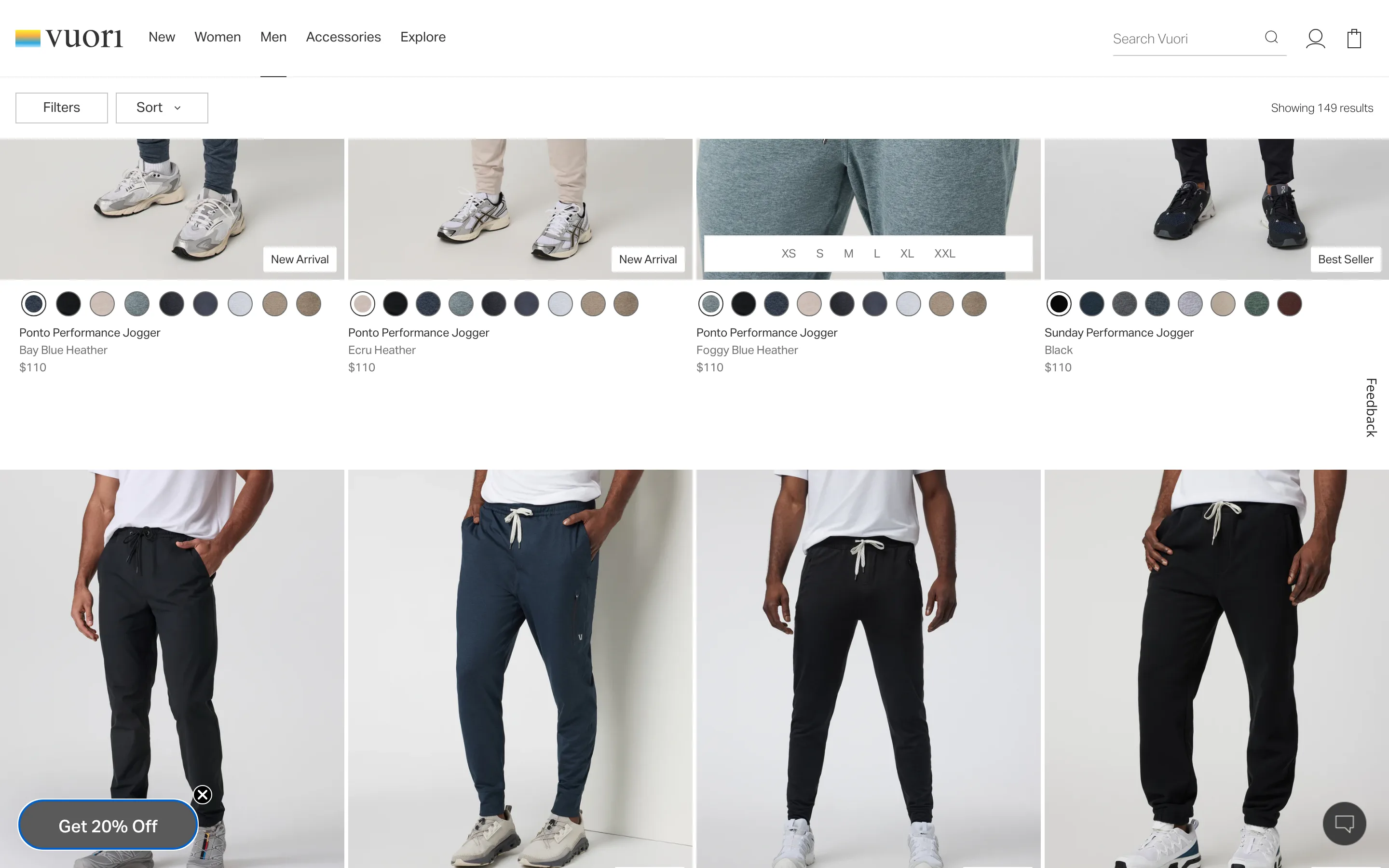
Each product tile in the grid carries a row of color swatches beneath the photo, letting a shopper see a different colorway without opening the product page.
What it is
Underneath each tile's product photo and name, a row of small circular swatches shows every color the item comes in, letting a shopper see the full color range at a glance without leaving the grid.
Why it works
A category grid usually shows one photo per product, in whatever color the merchandiser picked, which means a shopper whose favorite color is not the pictured one has no way to know it is even available without clicking in. Swatches answer that question directly on the grid, so a shopper scanning past a product in the "wrong" color does not skip past something they would actually have bought.
How to test it
- Hypothesis
- Showing color swatches on category tiles will lift add-to-cart rate, because shoppers can see a product's full color range without clicking into a product page that shows only one default color.
- Primary metric
- Add-to-cart rate (category grid sessions)
- Guardrail metric
- Category page load time, since rendering swatch options for every tile in a large grid adds more image weight per page
Related ideas
Want this tested on your store?
We run the experiment, call the result honestly, and get paid on what it adds.
See the performance program