Open a size picker straight from the category tile, no product page required
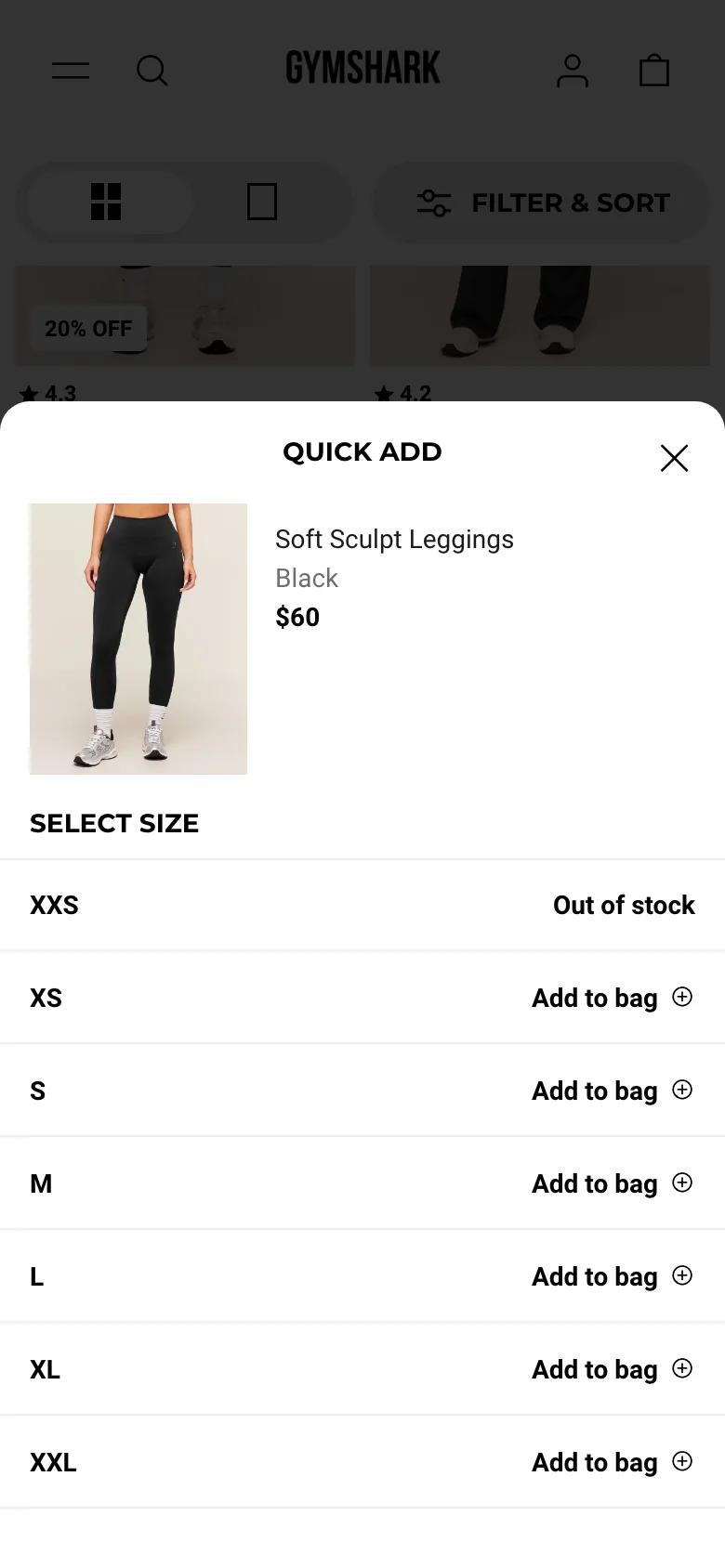
Tapping a small plus icon on a grid tile opens a lightweight size-picker panel with the product photo, price and a full size list, each size directly addable to the bag without loading the product page.
What it is
A small plus-icon button sits on every grid tile. Tapping it opens a bottom-sheet panel showing that exact product, photo, color, price, with every size listed and its own add-to-bag action, including an explicit "Out of stock" state for sizes that are not available, all without navigating away from the grid.
Why it works
A shopper who already knows their size and just wants to reorder a colorway or restock a favorite does not need the product page's reviews, description and gallery; the product page is friction they have to click through to reach the one thing they actually need, the size selector. Quick add collapses that entire trip into an open-and-buy interaction, which matters most for repeat buyers who already did their research on a prior visit.
How to test it
- Hypothesis
- Adding a quick-add size picker to category tiles will lift add-to-cart rate for returning visitors, because shoppers who already know their size can skip the full product page entirely.
- Primary metric
- Add-to-cart rate (returning-visitor category sessions)
- Guardrail metric
- Product-page-informed return rate, since items added without seeing the full description or reviews may be more likely to come back as the wrong fit
Related ideas
Want this tested on your store?
We run the experiment, call the result honestly, and get paid on what it adds.
See the performance program